In today’s fast-paced digital world, sharing information quickly is more important than ever. Whether you are a small business owner, a student, a marketer, or just someone who wants to share a WiFi password, a Free QR Code Generator Online is the ultimate tool you need. In 2026/27, QR codes have become a part of our daily life. From restaurant menus to payment systems, from product packaging to event tickets, you can see QR codes everywhere.
Our Free QR Code Generator Online – Create QR Code Instantly tool at Free Tools Hub Pro is designed to make your life easier. You don’t need to install any software, you don’t need to create an account, and you don’t need to pay a single penny. Just open the tool, enter your data, and your QR code is ready in less than 2 seconds. It is that simple, fast, and 100% free.
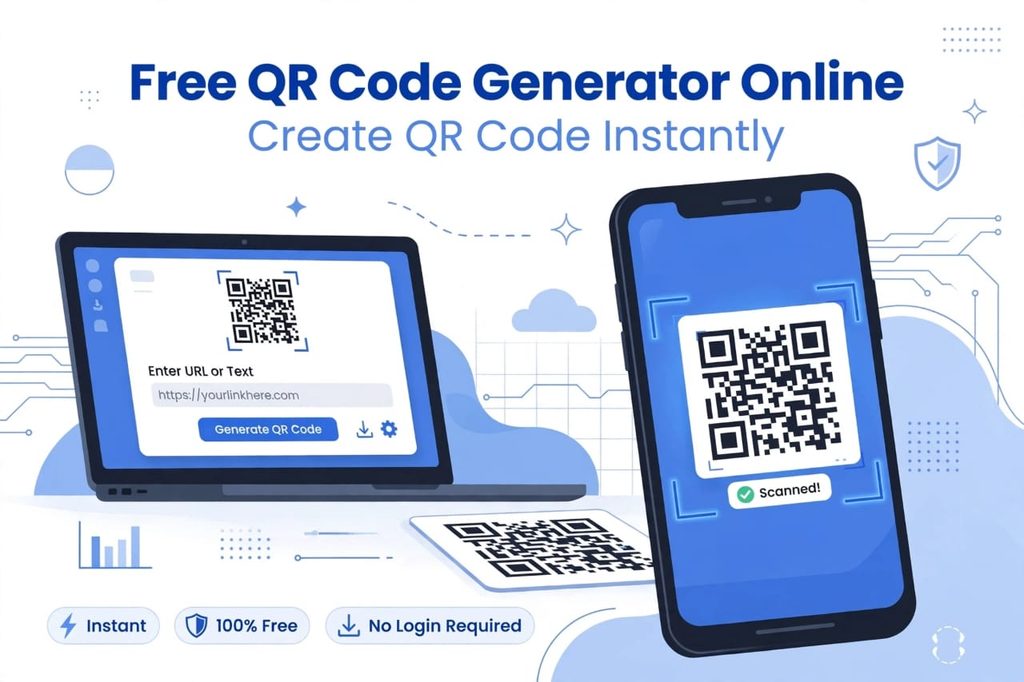
Table of Contents
What is a QR Code and Why Does It Matter So Much in 2026/27?
QR stands for Quick Response. It was invented in 1994 by a Japanese company Denso Wave, but it became truly mainstream after 2020. A QR code is a two-dimensional barcode that can store a lot more information than a traditional barcode. It can store URLs, plain text, email addresses, phone numbers, WiFi credentials, contact cards (vCard), UPI payment links, Google Maps locations, and much more.
In 2026/27, the importance of QR codes has grown even more because of contactless technology. People don’t want to type long URLs or complicated WiFi passwords. They just want to point their phone camera and get the job done. Businesses use it for marketing because a single scan can take a customer directly to their website, Instagram page, YouTube channel, or product demonstration video. That is why having a reliable, free, and instant QR code generator is not a luxury anymore, it is a necessity for every business and individual.
How Does Our Free QR Code Generator Online Actually Work?
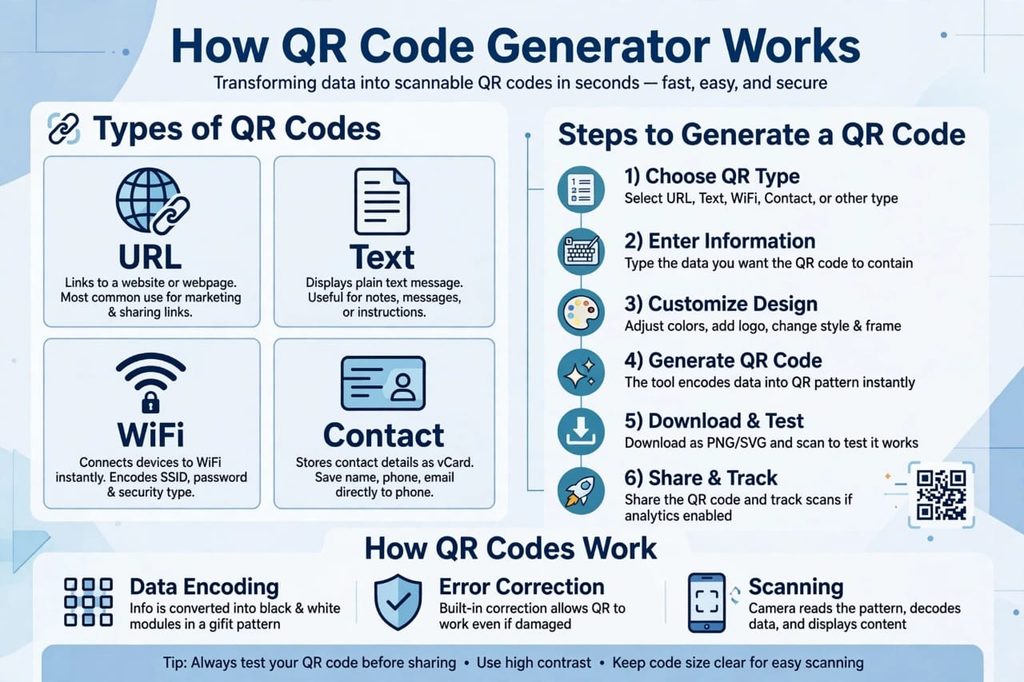
Our tool is built with simplicity and speed in mind. We have removed all the complex steps that other websites force you to follow. Here is the complete step-by-step process that our tool follows internally to create your code instantly:
Step 1: Choose Your QR Code Type. First, you select what kind of information you want to encode. We support 10+ types including URL, Text, Email, Phone, SMS, WiFi, vCard (Contact Card), Location, and Event.
Step 2: Enter Your Data Safely. If you choose URL, just paste your website link. If you choose WiFi, enter your network name (SSID) and password. Our system validates the data automatically to avoid errors.
Step 3: Customize The Design (Optional but Powerful). You can change the color of the QR code from classic black to your brand color. You can add your company logo in the center and select different stylish patterns for the corners and dots. This makes your QR code look professional and branded.
Step 4: Instant Encoding With High Error Correction. As soon as you enter the data, our advanced algorithm converts your text or link into a matrix of black and white squares using Reed-Solomon error correction. This powerful technology ensures your code remains scannable even if it is slightly damaged, dirty, or 30% covered.
Step 5: Download in High Quality for Any Use. You can download your QR code in PNG for regular digital use, SVG for printing on banners and t-shirts without losing quality, or PDF for official documents. All downloads are in 4K high resolution.
Step 6: Test Before You Share. We always recommend you scan the code once with your own phone camera to make sure it works perfectly before you print it on 1000 flyers. This one second of testing can save you a lot of money.
Top 7 Features of Our Free QR Code Generator Tool 2026/27
We have studied dozens of QR code tools online and found what people hate the most: forced sign-ups, ugly watermarks, low-resolution downloads, and limited scans. So we built our tool to solve all these problems forever.
- 100% Free Forever, No Hidden Charges: No trial period, no credit card required. You can generate unlimited QR codes for free, for a lifetime.
- No Watermark, 100% Clean Code: Your QR code will be completely clean and professional. We will never put our own logo on your code unless you want us to add it.
- High-Resolution 4K Download: Download in PNG, SVG, and EPS formats. Perfect for both small business cards and large-scale billboard printing.
- No Sign-Up Needed, Privacy First: We respect your privacy deeply. You don’t need to give us your email or name to generate a code.
- Logo and Color Customization: Make your QR code match your brand identity. Add your business logo and change colors to match your brand guidelines.
- Lifetime Validity, Never Expires: Our static QR codes never expire. Once created, they will work forever, even after 10 years.
- Super Secure and Private: We do not store your links or data on our servers. All QR codes are generated locally in your browser, so your private links remain 100% private and secure.
Advantages and Disadvantages – An Honest Human Review
We at Free Tools Hub Pro believe in transparency. No tool in this world is 100% perfect, and we want you to know both the good and bad sides before you use any QR code generator online. This is our honest review.
The Positive Side – Why Everyone Loves QR Codes:
- Super Fast and Extremely Convenient: It saves a huge amount of time and effort. You can share a 100-character long and complicated WiFi password in one single scan. No more typing mistakes.
- Cost-Effective Marketing for Small Business: For small businesses and startups, printing a small QR code on a flyer or product is much cheaper than printing long instructions, maps, or website links.
- Contactless and Hygienic Solution: Especially after the pandemic, people prefer scanning over touching physical menus, cash, or brochures. It feels safe and modern.
- Versatile and Multi-Purpose: One single tool can be used for 20+ different purposes, from personal use like sharing your contact to professional use like getting customer feedback.
- Increases Customer Engagement: A curious customer is more likely to scan a stylish QR code to see what is inside than to type a long URL manually.
The Negative Side – What You MUST Be Careful About:
- Security Risks and QRishing Scams: This is the biggest disadvantage. Hackers can create malicious QR codes that lead to fake phishing websites that steal your data. This is called QRishing. Always check the URL preview on your phone before opening any scanned link. Never scan random QR codes from unknown posters on the road.
- Dependence on Technology: If a person’s phone camera is broken, or they have no internet connection, or their battery is dead, the QR code becomes completely useless. It is not 100% offline.
- Static vs. Dynamic Confusion for Beginners: Many new users don’t understand the difference. A static QR code cannot be edited after creation. If you need to change the link later, you must create a brand new code. This wastes printed material.
- Design Over-Customization Can Break It: If you make the colors too light like yellow on white, or you make your company logo too big in the center, the QR code may become unscannable. Always maintain high contrast (dark color on light background).
- Overuse Can Annoy Customers: If you put 10 different QR codes on one single poster, customers will get confused and will not scan any of them. In design, less is more.
Static vs Dynamic QR Codes – Which One Should You Choose in 2026/27?
Static QR Code: The actual data (like your website link) is directly embedded inside the pattern of the code itself. It is 100% free, it never expires, and it does not need our server to work in the future. It is super reliable. But you cannot edit the data later and you cannot track how many people scanned it. Best for permanent things like your main website URL, your email address, or your home WiFi password.
Dynamic QR Code: The code contains a short redirect link that points to your actual data stored on a server. You can edit the destination link anytime without changing the QR code design. You can also track analytics like scan count and location. However, if the service provider’s server goes down, your code stops working, and most websites charge $10-$20 per month for it. On Free Tools Hub Pro, we currently focus on high-quality static codes for free to ensure 100% reliability and lifetime validity for our users.
Real-Life Practical Use Cases of Our Tool
- For Small Business Owners: Put a QR code on your business card that directly opens your Google Maps location. Put it on your product packaging that links to a how-to-use video tutorial on YouTube.
- For Restaurants and Cafes: No need to print menus again and again when prices change. Just create a QR code for your online menu. If the price changes, just update the online menu, the same QR code will still work.
- For Events, Weddings, and Birthdays: Create a beautiful QR code for your wedding invitation that contains the exact wedding location and an online RSVP form. Guests will love this modern touch.
- For Teachers and Students: Teachers can create QR codes for assignments, YouTube lecture links, or study material PDFs and paste them in the classroom. Students can scan and get all material instantly.
- For Personal and Daily Use: Share your home WiFi with guests without shouting the password loudly. Share your personal Instagram, LinkedIn, or your UPI payment ID instantly with friends.
Why Choose Free Tools Hub Pro Over Other Generators?
There are hundreds of QR code generators on Google, but why should you trust ours? The answer is simple: We are built for users, not for advertisers. Many free tools show 10 annoying pop-up ads before giving you the download button. We have a clean, fast, and beautiful interface. Many tools reduce the quality to 200px if you don’t pay. We give you print-ready 4K quality for free, forever. And most importantly, we are constantly updating our tool for 2026/27 standards with better error correction and more design options.
Final Conclusion – Create Your QR Code Instantly Now
A Free QR Code Generator Online is no longer just a fancy tech tool, it is a powerful bridge between the offline physical world and the online digital world. It helps you connect with your customers, friends, and audience in a single scan. At Free Tools Hub Pro, our mission is to provide you with a tool that is instant, free, secure, private, and extremely easy to use.
So what are you waiting for? Scroll up to the top of this page, use our Free QR Code Generator Online – Create QR Code Instantly 2026/27 tool, and create your first professional QR code in under 5 seconds. If you found this tool helpful, please share it with your friends and bookmark Free Tools Hub Pro for more amazing free tools that make your life easier.
Frequently Asked Questions (FAQs)
Q1: Is this QR code generator really 100% free or is there a catch?
Ans: Yes, it is 100% free forever with no catch at all. There is no trial, no limits on number of codes, and no watermark. You can create unlimited codes.
Q2: Do my QR codes created here expire after some time?
Ans: No, never. Our static QR codes never expire. They have lifetime validity. They will work perfectly even after 5 or 10 years.
Q3: Can I add my own company logo to the center of the QR code?
Ans: Yes, absolutely. You can upload your company logo and place it in the center. Just make sure the logo is not too large, keep it under 30% of the code area to keep it scannable.
Q4: What is the best file format to download for high-quality printing?
Ans: For small prints like business cards or flyers, PNG in high resolution is perfectly fine. For large prints like banners, t-shirts, mugs, or billboards, always download in SVG or EPS vector format. It will never get blurry.
Q5: Is it safe and private to generate my personal or business QR codes here?
Ans: Yes, 100% safe and private. We have designed our tool with privacy first. We do not store your links, text, or data on our servers. Everything is generated locally inside your own browser and is deleted as soon as you close the page.
Q6: My QR code is not scanning, what is the problem?
Ans: This usually happens due to two reasons. First, low contrast – you used light colors like yellow on white. Always use dark color on light background. Second, too much customization – your logo is too big. Try creating it again with black color and a smaller logo and it will work perfectly.